Skolar 1.1 Introduces Live Activities and App Blocking for iOS users
Studying isn't just about what you study — it's about focus.
With the recent Skolar 1.1, we're introducing two powerful iOS features designed to help students stay locked in and productive:
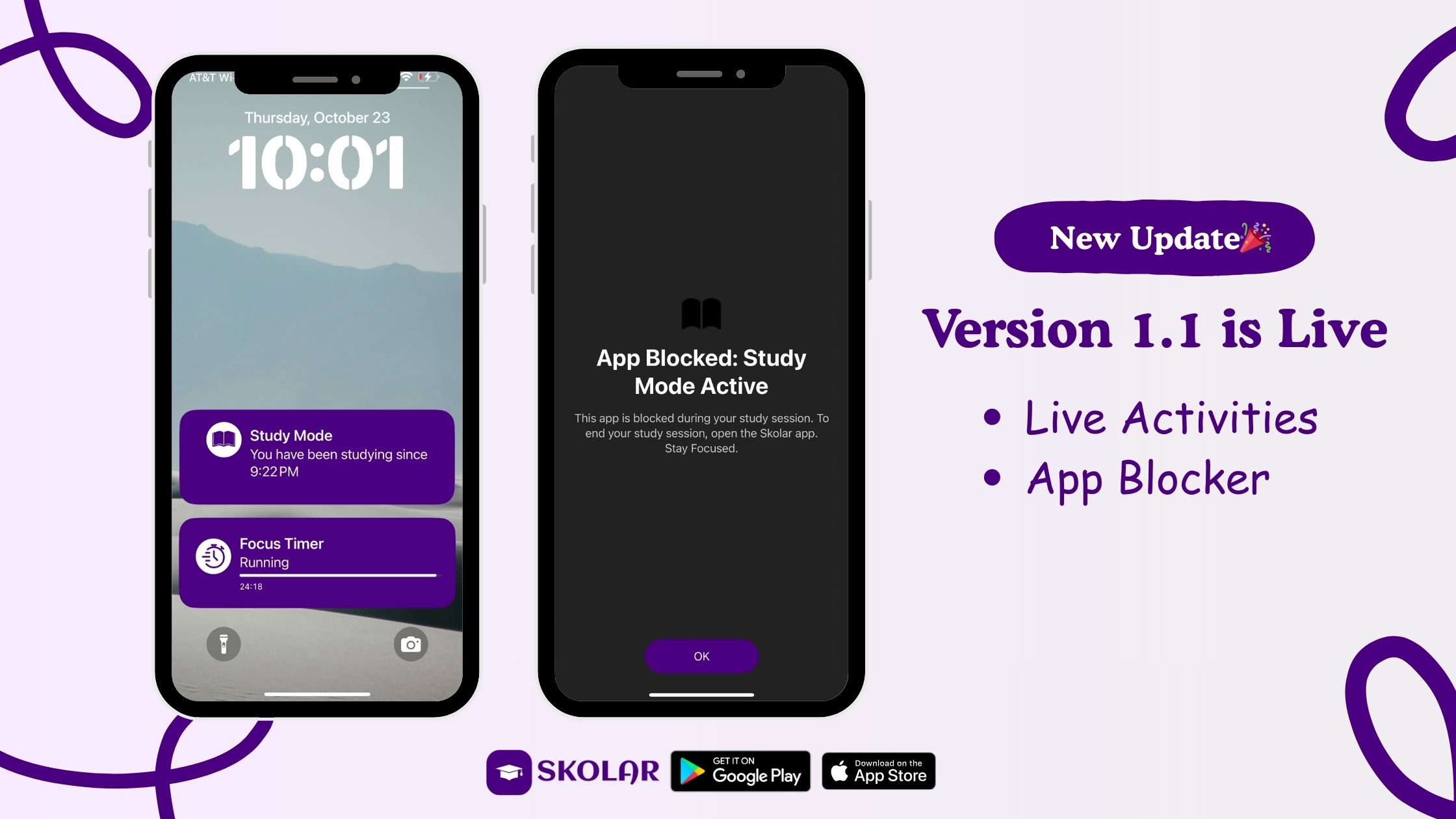
- Live Activities for Pomodoro timers & study sessions
- Built-in App Blocking while studying — free for all Skolar students
Live Activities: Your Study Timer, Always in Sight
When you start a Pomodoro timer or study session in Skolar, your timer now lives outside the app.
What this means:
- Your timer appears directly on your iPhone Lock Screen
- On supported iPhones, it shows in the Dynamic Island
- No need to reopen Skolar to check time remaining
- Real-time updates while you study
Whether you're deep into notes, reviewing flashcards, or listening to a study podcast, your progress stays visible — keeping you accountable and on track.
Focus shouldn't require extra taps. Skolar 1.1 keeps your study session front and center.
App Blocking: Study Without Distractions (Now Built In)
Distractions are one of the biggest reasons students lose focus.
With Skolar 1.1, you can now block distracting apps while studying, directly inside Skolar.
How it works:
- Select the apps you want blocked (social media, games, etc.)
- Start a study session.
- Those apps become unavailable until your session ends
Think tools like Opal, but integrated into your study workflow, and free for Skolar students.
Why this matters:
- Fewer interruptions
- Deeper focus
- More productive study sessions
- Better retention of what you're learning
Built to Work With the Rest of Skolar
Live Activities and App Blocking work seamlessly with Skolar's core features:
- Notes & Flashcards — stay focused while creating or reviewing
- Lecture Recording & Transcription — record and review without distractions
- AI-Generated Study Podcasts — listen while your focus stays protected
- To-Dos & Assignments — work through tasks with intentional time blocks
- Skolar AI — research topics and summarize content during focused sessions
Everything connects into one unified study system.
Why We Built This
Students told us the same thing over and over:
"I sit down to study… and end up on my phone."
Skolar now answers to that problem.
By combining time awareness (Live Activities) and intentional limits (App Blocking), we're helping students reclaim their attention.
Available Now on iOS
Skolar 1.1 is rolling out now for iOS users.
If you haven't updated yet:
- Update Skolar from the App Store
- Start a Pomodoro or study session
- Turn on App Blocking
- Study — distraction free
Smarter studying. Fewer distractions.